
This project was created as a quick test of Figma Make based on the following brief:
Create a website home page for a hedge maze doing a Christmas event. I want it to have a footer with the contact information. The hero banner needs to be the hedge maze under snow. Under the banner there should be the list of activities planned, which you can make up. The top menu bar should include a category for old editions photos, a contact category

On the left was my first draft. I was pleased with the overall layout, especially the activity cards and the clarity of the header and footer content.
The main limitation in the initial version was that it didn’t follow the required colour scheme, simply because I hadn’t defined it at the start. Once the palette was set, I asked Figma Make to update the header and footer colours for better consistency.
Colour palette:


With the base established, I refined the design further in Figma. I applied a grid system for better structure and replaced the hero image with one that better matched the intended atmosphere and the look of the hedge maze.
I also updated the typography, using Araboto Light for body text and “Christmas Bell – Personal Use” for headings and festive iconography.
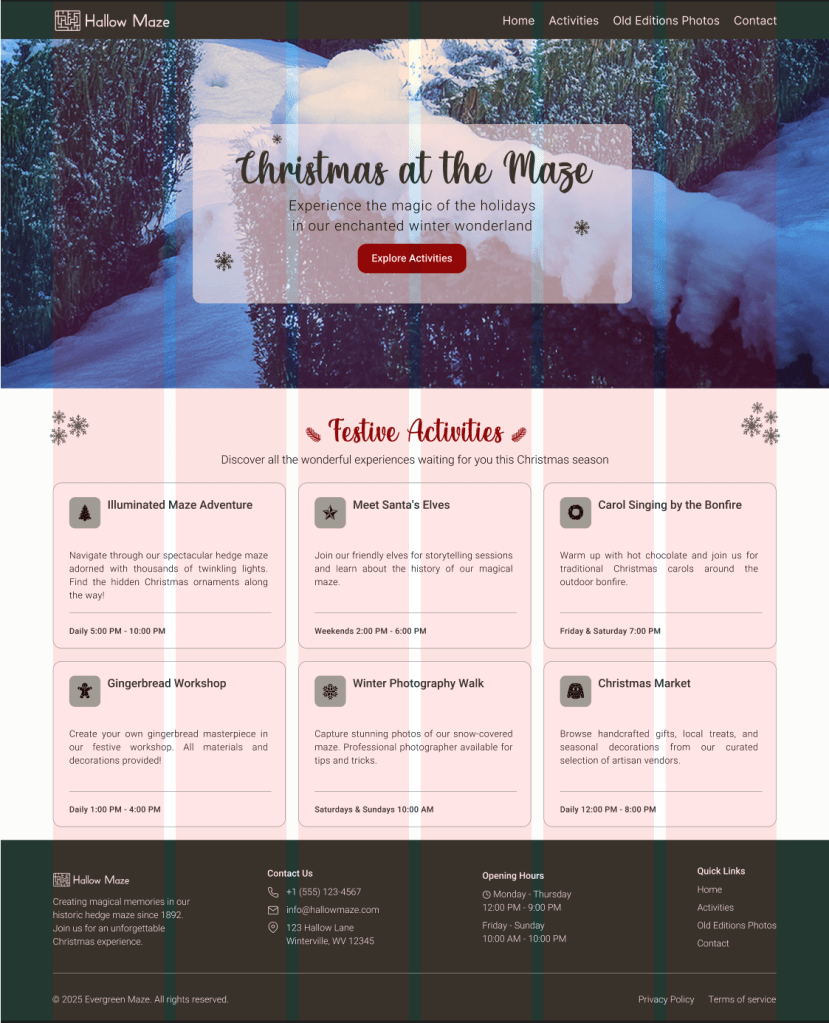
Here is the final prototype:
 Sarah Bousselet